Most people meet Linux as a logo, a cloud checkbox, or “the thing Android is built on.” That is not wrong - but it is incomplete.
Linux is the software that sits between your programs and your hardware. It decides which process runs next, how memory is shared, how disks and networks appear as files, and how a crash in one app is (usually) stopped from taking down the whole machine.
If you understand that layer, every server, container, phone, and Raspberry Pi stops looking like magic.
This is not a distro shopping guide. It is the under-the-hood map I wish I had earlier: kernel vs distro, processes, memory, system calls, and the filesystem worldview. Once that map is solid, package managers and desktop choices become details - not the definition of Linux.
Linux is not one product
This is the first confusion to clear.
People say “Linux” to mean three different things:
- The Linux kernel - the core program Linus Torvalds started in 1991. It talks to hardware and manages processes, memory, devices, and networking.
- A Linux distribution - Ubuntu, Fedora, Debian, Arch, Alpine, and hundreds more. A distro packages the kernel with tools, a package manager, defaults, and (often) a desktop.
- The GNU/Linux system - in practice, most “Linux systems” also include
GNU userland tools (
bash,coreutils, compilers, libraries) that make the machine usable for humans.
When someone asks “What is Linux?”, the precise answer is usually: an operating-system kernel, and the everyday answer is: a family of operating systems built around that kernel.
Both are useful. This article focuses on what the kernel does, because that is the under-the-hood story.
What an operating system is for
Hardware is blunt. A CPU executes instructions. Memory stores bits. A disk holds blocks. A network card moves packets.
Programs need something kinder:
- Isolation - my browser should not overwrite your password file
- Sharing - many programs share one CPU and one disk without chaos
- Abstraction - “open this file” instead of “talk to sector 48291 on disk 0”
- Safety - a buggy app should die; the machine should keep breathing
That is the OS job. Linux is one of the world’s most successful answers to it - especially for servers, embedded devices, and developer machines.
The stack: from silicon to shell
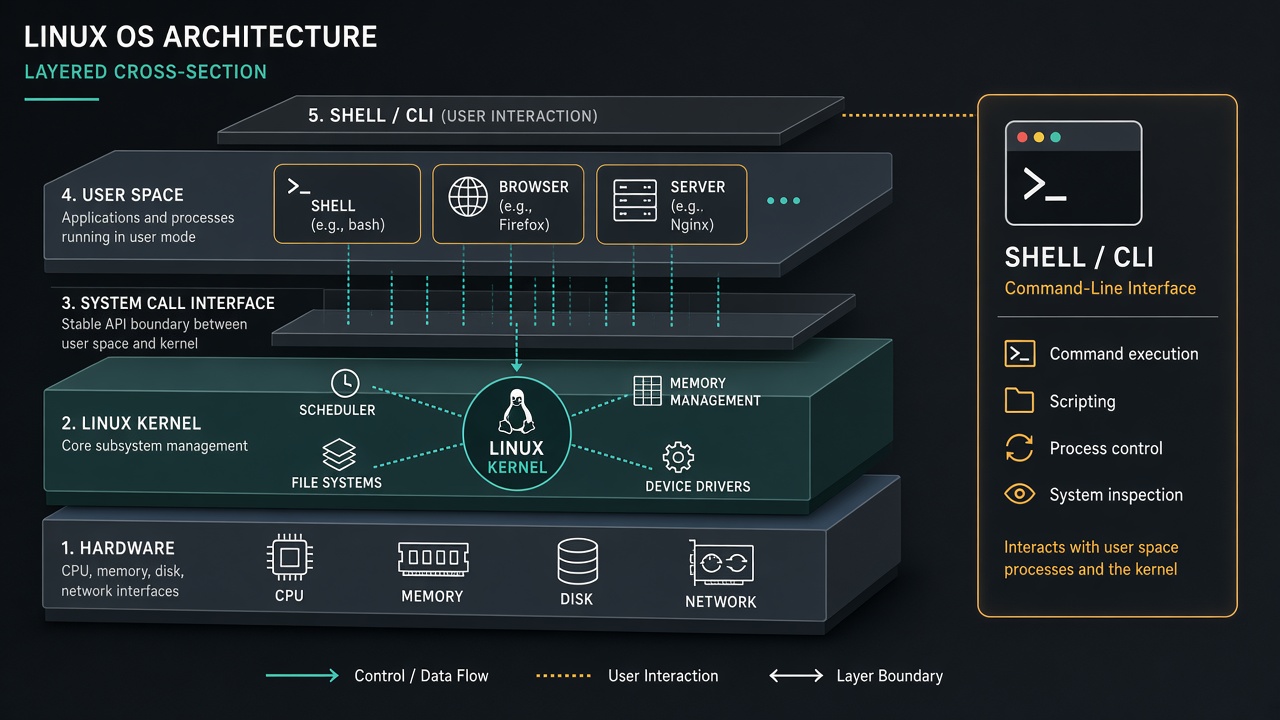
A running Linux system is a stack:
| Layer | What lives here | Examples |
|---|---|---|
| Hardware | Physical or virtual devices | CPU, RAM, SSD, NIC |
| Kernel | Privileged core of Linux | Scheduler, memory manager, drivers, VFS |
| System call interface | Controlled door into the kernel | read, write, fork, mmap, socket |
| User space | Everything not the kernel | Shell, browsers, databases, your app |
| Interfaces you touch | How humans and scripts drive the machine | Terminal, desktop, systemd services |
Two ideas matter more than the diagram:
- Kernel space runs with high privilege. A bug here can freeze or panic the machine.
- User space runs with restricted privilege. Programs ask the kernel for dangerous work through system calls.
That boundary is why Linux can host thousands of processes and still feel stable.
Containers do not invent a second kernel. They share the host kernel and isolate with namespaces and cgroups. That is why a container escape can still be a host problem - and why “it works in Docker” is still “it works on this Linux kernel.”
What the Linux kernel actually owns
Strip the marketing away and the kernel is a set of managers.
Process management
Linux tracks every running program as a process (and often many threads inside it). It assigns a PID, tracks state, and decides who gets CPU time.
Memory management
RAM is finite. Linux maps virtual addresses for each process, pages memory in and out, shares read-only pages, and enforces isolation so process A cannot quietly rewrite process B’s heap.
Filesystems and VFS
Disk formats differ (ext4, XFS, btrfs, and more). The Virtual File System gives one familiar model: files, directories, permissions, open/read/write.
Device drivers
Keyboards, GPUs, SSDs, and network cards are different beasts. Drivers teach the kernel how to talk to them, then expose them through standard interfaces.
Networking
Sockets, routing, firewall hooks, TCP/IP - the kernel is where packets become connections your programs can use.
Security boundaries
Users, groups, file modes, capabilities, namespaces, cgroups, SELinux/AppArmor policies - Linux’s security model is deep. At the base: who is allowed to do what to which resource.
Processes: the unit of life on Linux
If you learn only one Linux idea deeply, learn processes.
A process is a running instance of a program: its memory, open files, credentials, and execution state. When you type a command, you are usually asking a shell to start a process.
How a new process is born
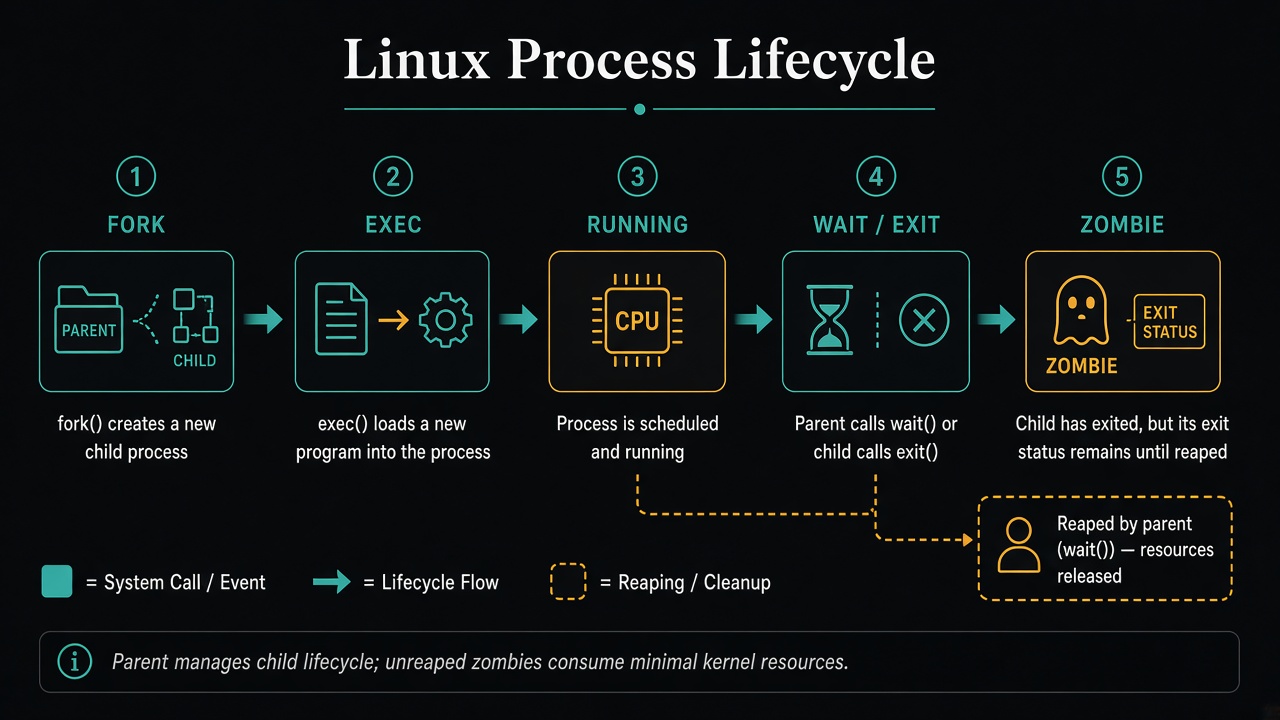
On classic Unix/Linux, creation is a two-step dance:
fork- the parent process clones itself. The child starts as a copy (with copy-on-write efficiency under the hood).exec- the child replaces its memory image with a new program.
That is why shells feel so flexible: they fork, then exec whatever you named.
# Roughly what a shell does when you type `ls`
# 1) fork a child
# 2) child execve("/bin/ls", ...)
# 3) parent wait() for the exit status
States you will meet
Processes move through states such as:
- Running / runnable - executing or waiting for CPU
- Sleeping - waiting for I/O, a lock, or a timer
- Stopped - paused (for example by a signal)
- Zombie - finished, but the parent has not yet collected its exit status
Zombies are not haunted. They are bookkeeping. A responsible parent calls
wait (or equivalent) to reap them.
The scheduler
With more runnable processes than CPU cores, Linux must multiplex time. The scheduler picks who runs next, aiming for fairness and responsiveness. You feel it every time a compile and a video call share one laptop.
Signals
Signals are software interrupts to a process: SIGTERM asks politely to exit,
SIGKILL ends it forcefully, SIGINT is what Ctrl+C usually sends. They are
one of the oldest control planes in Unix.
System calls: the contract with the kernel
User programs do not poke hardware directly. They call the kernel.
Examples of the contract:
open/read/write/close- file and device I/Ommap- map files or anonymous memory into the address spacefork/execve/exit/wait- process lifesocket/connect/bind/listen/accept- networkingioctl- device-specific control when the generic calls are not enough
Everything from cat to Chrome eventually reduces to these (and similar)
requests. High-level frameworks are beautiful stories told on top of system
calls.
# See which syscalls a tiny program actually makes
strace -e trace=openat,read,write,close cat /etc/hostname
That one command is often enough to turn “framework magic” into “kernel contract.”
The filesystem is a worldview
On Linux, the famous line is almost true: everything is a file - or at least, many things are reached through file-like interfaces.
- Regular files and directories
- Device nodes under
/dev - Process and kernel info under
/proc - Sysfs under
/sysfor device and driver details
Permissions matter. A simplified mental model:
- user / group / other
- read / write / execute
Execute on a directory means “may enter it.” Execute on a file means “may run it as a program.” That small vocabulary explains a surprising amount of “why permission denied?”
Paths are rooted at /. There is no C:. Mounts attach other filesystems into
the same tree - USB drives, network shares, container layers - so the namespace
stays unified.
ls /proc/self          # this process, as files
ls /sys/class/net      # network interfaces as objects
mount | head           # what is attached where
Users, root, and least privilege
Linux inherited Unix multi-user design.
- Ordinary users are constrained
- root (UID 0) can do almost anything
- Modern systems often avoid all-day root via
sudoand finer capabilities
Good operators and good programs ask for the least privilege they need. That is not paranoia. It is blast-radius control.
In production, “run as root because it was easier in the Dockerfile” is how a single bug becomes a host compromise. Prefer a dedicated user, drop capabilities you do not need, and treat privilege as a budget you spend deliberately.
The shell: your hands on the machine
The shell is a user-space program - often Bash, sometimes Zsh, Fish, or a scripting shell. It is not the kernel.
It is, however, the most important interface for understanding Linux, because it exposes the process model without hiding it:
ps aux          # what is running?
top             # who is hungry for CPU/RAM?
ls -la          # what exists, and who may touch it?
uname -r        # which kernel release am I on?
free -h         # how much memory is left?
df -h           # how full are the mounts?
Pipelines (cmd1 | cmd2) are process composition: stdout of one becomes stdin
of another. That small idea scales into sophisticated automation.
Distros: same kernel, different kitchens
Ubuntu is not Fedora. Alpine is not Arch. They may run the same family of kernels and still feel different because of:
- package managers (
apt,dnf,pacman,apk) - init and service systems (commonly systemd today)
- default desktop environments - or none at all
- release cadence and security update policy
- philosophy: polished defaults vs maximum control vs minimal footprint
If the kernel is the engine, the distro is the car built around it.
How Linux helps as an OS (in practice)
Abstract virtues become concrete wins:
- Servers - stable process model, strong networking, remote administration
- Cloud and containers - namespaces and cgroups make isolation cheap; images ship user space while sharing a host kernel
- Development - toolchains, shells, and “the machine is scriptable”
- Embedded / IoT / Android - a tunable kernel for constrained or customized hardware
- Cost and control - open source means you can inspect, patch, and deploy without a license gate at the metal
Linux did not win every desktop. It won the world’s infrastructure - and a lot of the world’s pockets.
A tiny mental model you can keep
When a program “does something,” ask:
- Is this user space work (compute in my process)?
- Or does it need kernel help (disk, network, new process, memory map)?
- If it needs help, which system call is the real request?
- Which process identity and permissions decide yes/no?
That four-question loop is enough to debug half of “mysterious Linux behavior.”
A 10-minute drill that makes this stick
Pick any running service on a machine you own and answer:
- What is its PID, user, and working directory?
- Which files and sockets does it have open?
- Which mount and path does its data live on?
- If it dies, who restarts it (systemd unit? container runtime? nothing)?
pidof nginx || true
ls -l /proc/$(pidof nginx | awk '{print $1}')/fd 2>/dev/null | head
systemctl status nginx --no-pager 2>/dev/null | head
If you can answer those without panic, you are no longer treating Linux as a black box. You are operating it.
What Linux is, finally
Linux is:
- a kernel that multiplexes hardware for many programs
- the foundation of distributions people install and operate
- a process-centered world with files, permissions, and system calls as the shared language
- an operating system designed for sharing, isolation, and long uptimes
You do not need to memorize every subsystem to be dangerous (in the good way). You need a clean map: hardware beneath, kernel in the middle, processes above, shell as your flashlight.
Once that map is in your head, “What is Linux?” stops being a trivia question. It becomes a way of seeing every machine you touch.